When you create a fresh MonoGame 3.6 project by with one of the original templates, then the “app.manifest” file is automatically a part of your project (root).
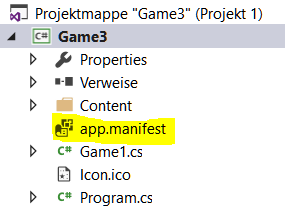
When you use an older version of MonoGame or upgraded from an older one, then you can easily add the manifest file by yourself.
Just add a new file to your project, call it “app.manifest” and add the following to it:
<?xml version="1.0" encoding="utf-8"?>
<assembly manifestVersion="1.0" xmlns="urn:schemas-microsoft-com:asm.v1">
  <assemblyIdentity version="1.0.0.0" name="Game1"/>
  <trustInfo xmlns="urn:schemas-microsoft-com:asm.v2">
    <security>
      <requestedPrivileges xmlns="urn:schemas-microsoft-com:asm.v3">
        <requestedExecutionLevel  level="asInvoker" uiAccess="false" />
      </requestedPrivileges>
    </security>
  </trustInfo>

  <compatibility xmlns="urn:schemas-microsoft-com:compatibility.v1">
    <application>
      <!-- A list of the Windows versions that this application has been tested on and is
           is designed to work with. Uncomment the appropriate elements and Windows will
           automatically selected the most compatible environment. -->

      <!-- Windows Vista -->
      <supportedOS Id="{e2011457-1546-43c5-a5fe-008deee3d3f0}" />

      <!-- Windows 7 -->
      <supportedOS Id="{35138b9a-5d96-4fbd-8e2d-a2440225f93a}" />

      <!-- Windows 8 -->
      <supportedOS Id="{4a2f28e3-53b9-4441-ba9c-d69d4a4a6e38}" />

      <!-- Windows 8.1 -->
      <supportedOS Id="{1f676c76-80e1-4239-95bb-83d0f6d0da78}" />

      <!-- Windows 10 -->
      <supportedOS Id="{8e0f7a12-bfb3-4fe8-b9a5-48fd50a15a9a}" />

    </application>
  </compatibility>

  <application xmlns="urn:schemas-microsoft-com:asm.v3">
    <windowsSettings>
      <dpiAware xmlns="http://schemas.microsoft.com/SMI/2005/WindowsSettings">true/pm</dpiAware>
    </windowsSettings>
  </application>

</assembly>
(This is what the original file contains)
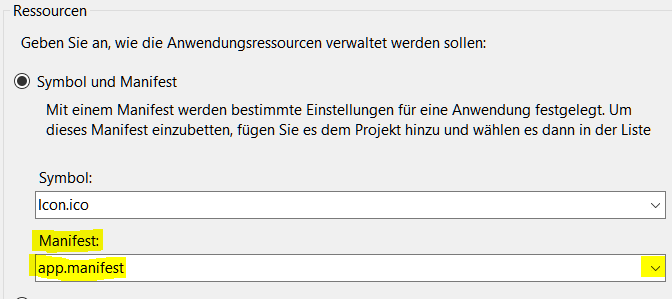
After that you need to open the Properties of your project and select the new manifest file:
Edit: Please read the additional infomation provided by @Jjagg