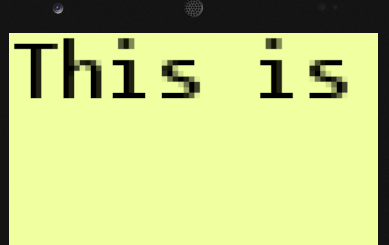
Yea I see it on Android as well. I don’t really know how to do the same image analysis on Android that I do on Windows (screen cap and then zoom without smoothing), so I just rendered to a target and then scaled that up (both using PointClamp) to the screen.
This is a pretty easy test to set up, can you maybe give it a try too on your system and let me know if you see the same issue?
To reproduce…
- Create new MonoGame project (Windows DX or Android)
- Create a new sprite font and add it to your content project.
- In the SpriteFont file, set FontName to Consolas, leave Size as the default (12).
- Add the following code to your Game1.cs file.
Add the following member variables (below graphics and spriteBatch)
        SpriteFont _font;
        RenderTarget2D _target;
Add the following to your LoadContent method…
            _font = this.Content.Load<SpriteFont>("Font");
            _target = new RenderTarget2D(graphics.GraphicsDevice, 400, 400);
Add the following to your Draw method, above the call to base.Draw…
            // Render to target
            graphics.GraphicsDevice.SetRenderTarget(_target);
            graphics.GraphicsDevice.Clear(Color.Transparent);
            spriteBatch.Begin(SpriteSortMode.Deferred, BlendState.AlphaBlend, SamplerState.PointClamp);

            spriteBatch.DrawString(_font, "This is a test!", Vector2.Zero, Color.Black);

            spriteBatch.End();

            // Render to screen
            graphics.GraphicsDevice.SetRenderTarget(null);
            graphics.GraphicsDevice.Clear(new Color(240, 255, 160));
            spriteBatch.Begin(SpriteSortMode.Deferred, BlendState.AlphaBlend, SamplerState.PointClamp);

            int scaleFactor = 16; // Set this to whatever. On my device with 1080x1920 resolution, this is appropriate.
            Rectangle dest = new Rectangle(0, 0, _target.Width * scaleFactor, _target.Height * scaleFactor);
            spriteBatch.Draw(_target, dest, Color.White);

            spriteBatch.End();
Here’s a screen cap from the simulator on my machine, which matches the results I get from my WindowsDX version.