while were in the nightly build page we see two windows download links
were does this go “it is unclear”
its appears a separate download but not a self installer
MonoDevelop.MonoGameContent_3.0.0.mpack (6.16 MB)
WindowsMonoDevelop.MonoGameContent_3.0.0.mpack (6.16 MB)
MonoGameInstaller-3.2.exe (30.78 MB) //installer
Documentation.zip (9.01 MB)
WindowsTests.zip (35.29 MB)
Total size:
87.35 MB
from here we would move to the documentation page
which circling back up to the top of the topic
were my original post gives the shown error
this is thrown when you simply try to add a new fx file to see if monogame can load it thru its pipeline,
which might make you think that you need to make a xnb build by xna ?
but from reading the top line of the documentation it suggests
monogame can load a .fx not a effect.xnb if set up correctly
so this can be confusing yet again which then leads you to
wonder if the install is correct ?
or
if you did something wrong along the way
if you are missing something that is not documented
which others already using it have found the answer to
on some obscure page
under using The Pipeline Tool
The Pipeline Tool
is used to organize and define content for use with MonoGame. It is
installed as part of the MonoGame SDK Installer or can be build directly from source if needed
but were it is it ?
what does it ask for and what does it give ?
after installing the nightly
the folder shows in programsx86 for monogame no pipline.exe tool
or within any of the various platform folders ?
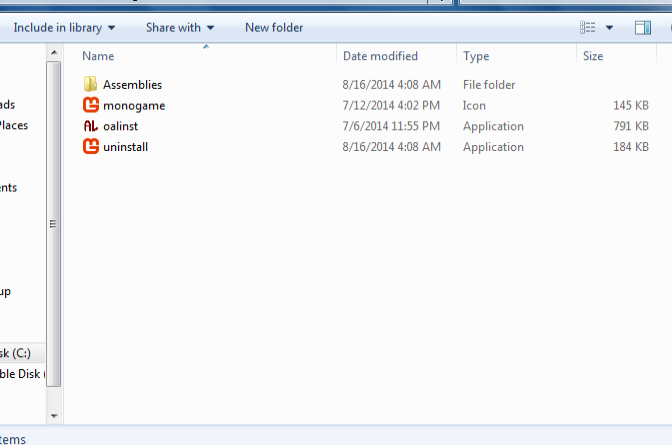
if it is a separate download…
it should be listed on the download page as a separate download link
here’s my previous attempt
Problem Running a .Fx on win7 vs2013 xna refresh monogame nightly windows
this was a while back and ended in failure as well
later i got it to build the mgfx file
but it still loaded corrupt or errored no matter what i did
being in the box its hard to see
what problems will be for new guys coming in from the outside