Hi there,
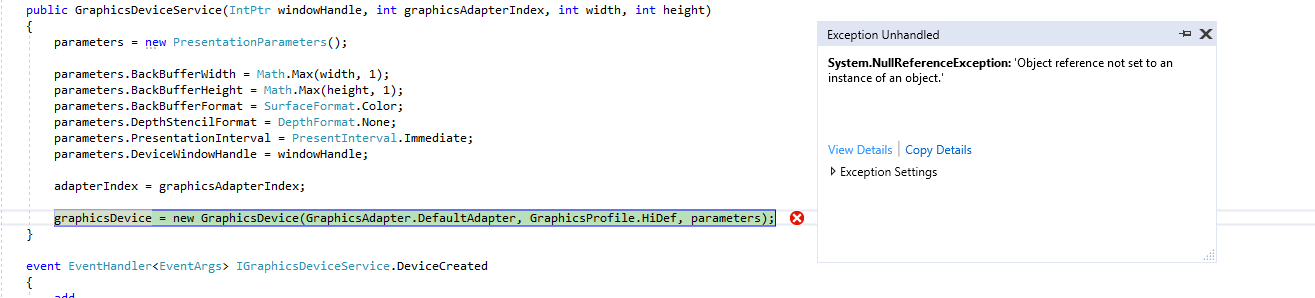
I’m getting a NullReferenceException when trying to create a GraphicsDevice instance, and was wondering if anyone knows what I need to do to fix it.
So the code I’m using to create the device is
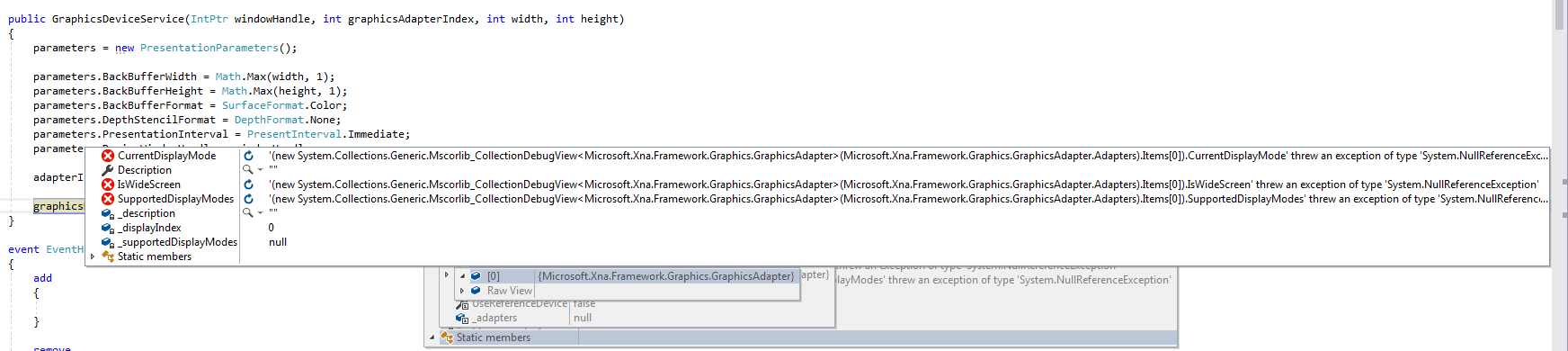
And the only Null value that I can find is the supportedDisplayModes in the DefaultAdapter itself
Any idea why that might be null? Is it likely to be a timing issue? This has only crept in to my code base since upgrading to MonoGame 3.2.
I should probably note that when I actually step in to the catch statement, the supportedDisplayModes variable is no longer Null
Thanks for the help!
I tried putting in a while loop before creating the device, to wait for supportedDisplayModes to be valid, but I’m still getting a NullReferenceException when trying to create the device
I’ve also tried initialising the PresentationParameters before creating the device, but again no luck.
Hi, If you download the source, you can see that you catch exception in private method - PlatformSetup() (GraphicsDevice.cs) in that line
var wnd = (Game.Instance.Window as OpenTKGameWindow).Window.WindowInfo;
because the Game.Instance is null. It turns out that since version 3.2 create GraphicsDevice outside Game class is impossible 
However if anyone know some way to do this - please share it
Ah thanks for digging in to that! Good to know I’m not going crazy 
I ended up deriving my engine class from Game and overriding the window handle for the PresentationParameters.
If I understand, you have successfully insert monogame window inside WPF (or WinForms). Could you share the code based on the standard class Game.
I would be very grateful 
Yeah no worries, here you go :
#region Using

using System;
using System.Windows.Forms;

using Microsoft.Xna.Framework;
using Microsoft.Xna.Framework.Graphics;
using Microsoft.Xna.Framework.Input;

#endregion


namespace Engine
{
    using ButtonState   = Microsoft.Xna.Framework.Input.ButtonState;
    using Keyboard      = Microsoft.Xna.Framework.Input.Keyboard;
    using Keys          = Microsoft.Xna.Framework.Input.Keys;


    /// <summary>
    /// The main class for the engine, handles all of the manager and service updates.
    /// </summary>
    public class Engine : Game
    {
        #region Public Functions
        #endregion


        #region Overridden Functions

        /// <summary>
        /// </summary>
        protected override void Initialize()
        {
            base.Initialize();
        }


        /// <summary>
        /// </summary>
        protected override void LoadContent()
        {
            // Create a new SpriteBatch, which can be used to draw textures.
            mySpriteBatch = new SpriteBatch(GraphicsDevice);
        }


        /// <summary>
        /// </summary>
        protected override void UnloadContent()
        {
        }


        /// <summary>
        /// </summary>
        protected override void Update(GameTime gameTime)
        {
            if( GamePad.GetState(PlayerIndex.One).Buttons.Back == ButtonState.Pressed || Keyboard.GetState().IsKeyDown(Keys.Escape) )
            {
                Exit();
            }

            base.Update(gameTime);
        }


        /// <summary>
        /// renders the game
        /// </summary>
        protected override void Draw( GameTime gameTime )
        {
            GraphicsDevice.Clear( Color.DarkGray );

            base.Draw(gameTime);
        }

        #endregion


        #region Accessors

        /// <summary>
        /// whether the engine should run in a window other than the one provided by Game::Run
        /// </summary>
        public bool UseExternalWindow
        {
            get;
            set;
        }


        /// <summary>
        /// handle to external window
        /// </summary>
        public IntPtr ExternalWindowHandle
        {
            get;
            set;
        }

        /// <summary>
        /// whether common content has been loaded
        /// </summary>
        private bool CommonContentLoaded
        {
            get;
            set;
        }

        #endregion


        #region Static Accessors

        /// <summary>
        /// engine instance
        /// </summary>
        public static Engine GetInstance()
        {
            if( myEngineInstance == null )
            {
                myEngineInstance = new Engine();
            }

            return myEngineInstance;
        }

        #endregion


        #region Private Functions

        /// <summary>
        /// construction
        /// </summary>
        private Engine() : base()
        {
            myGraphicsDeviceManager = new GraphicsDeviceManager(this);

            ExternalWindowHandle    = IntPtr.Zero;
            UseExternalWindow       = false;
            myCommonAssets          = new OECommonAssets();
            CommonContentLoaded     = false;

            myGraphicsDeviceManager.PreparingDeviceSettings += OnPreparingDeviceSettings;
        }


        /// <summary>
        /// initialises the content manager once
        /// </summary>
        private bool InitialiseContentManager()
        {
            Content.RootDirectory = "Common";

            CommonContentLoaded = myCommonAssets.Load( Project.DataFolder );

            return CommonContentLoaded;
        }

        #endregion


        #region Private Event Handlers

        /// <summary>
        /// sets the window handle for the engine, if using an external window
        /// </summary>
        private void OnPreparingDeviceSettings( object aSender, PreparingDeviceSettingsEventArgs someArgs )
        {
            if( UseExternalWindow && ExternalWindowHandle != IntPtr.Zero )
            {
                Form gameForm           = Control.FromHandle(this.Window.Handle) as Form;
                gameForm.Shown          += HideGameWindow;

                someArgs.GraphicsDeviceInformation.PresentationParameters.DeviceWindowHandle = ExternalWindowHandle;
            }
        }


        /// <summary>
        /// hides the window created by Game::Run if using an external window
        /// </summary>
        void HideGameWindow( object aSender, EventArgs e )
        {
            Form gameForm = aSender as Form;
            if( gameForm != null )
            {
                gameForm.Hide();
            }
        }

        #endregion


        #region Private Variables

        private GraphicsDeviceManager   myGraphicsDeviceManager     = null;
        private SpriteBatch             mySpriteBatch               = null;

        private static Engine     	myEngineInstance            = null;

        #endregion
    }
}
So first I create an instance of Engine from my WPF appliation, I set ExternalWindowHandle and UseExternalWindow, then finally Engine.GetInstance.Run() (in it’s own thread) :
Engine engine         = Engine.GetInstance();
engine.UseExternalWindow    = true;
engine.ExternalWindowHandle = aWindowHandle;

myGameEngineThread = new Thread( () => { OrangeEngine.GetInstance().Run(); } );
myGameEngineThread.Start();
This just what I need, thank you 
Is it possible to get a working GraphicsDevice without running the Engine thread? XNA allowed me to create graphics without a game engine, which is very useful for people not making games, but still want to use the 3d geometry library etc.
[EDIT]
I am using the Windows GL version. I got the source and made some minor changes, which gets me going. In particular, I check whether Game.Instance is null before using its properties to set wnd, and second, I later set wnd based on the PresentationParameters window handle. Basically it looks like the existing implementation ignores the PresentationParameters window handle that may have been passed into the GraphicsDevice constructor.
I make no claim that this is a general or good fix, just that it works in my case and identifies the problem.
MonoGame.Framework\Graphics\GraphicsDevice.OpenGL.cs
        private void PlatformSetup()
        {
#if WINDOWS || LINUX || ANGLE
            GraphicsMode mode = GraphicsMode.Default;
            var wnd = (Game.Instance == null)? null : (Game.Instance.Window as OpenTKGameWindow).Window.WindowInfo;

            #if GLES
            // Create an OpenGL ES 2.0 context
            var flags = GraphicsContextFlags.Embedded;
            int major = 2;
            int minor = 0;
            #else
            // Create an OpenGL compatibility context
            var flags = GraphicsContextFlags.Default;
            int major = 1;
            int minor = 0;
            #endif

            if (Context == null || Context.IsDisposed)
            {
                var color = PresentationParameters.BackBufferFormat.GetColorFormat();
                var depth =
                    PresentationParameters.DepthStencilFormat == DepthFormat.None ? 0 :
                    PresentationParameters.DepthStencilFormat == DepthFormat.Depth16 ? 16 :
                    24;
                var stencil =
                    PresentationParameters.DepthStencilFormat == DepthFormat.Depth24Stencil8 ? 8 :
                    0;

                var samples = 0;
                if (Game.Instance != null && Game.Instance.graphicsDeviceManager.PreferMultiSampling)
                {
                    // Use a default of 4x samples if PreferMultiSampling is enabled
                    // without explicitly setting the desired MultiSampleCount.
                    if (PresentationParameters.MultiSampleCount == 0)
                    {
                        PresentationParameters.MultiSampleCount = 4;
                    }

                    samples = PresentationParameters.MultiSampleCount;
                }

                mode = new GraphicsMode(color, depth, stencil, samples);
                try
                {
                    wnd = OpenTK.Platform.Utilities.CreateWindowsWindowInfo(PresentationParameters.DeviceWindowHandle);
                    Context = new GraphicsContext(mode, wnd, major, minor, flags);
                }
                catch (Exception e)
                {
                    Game.Instance.Log("Failed to create OpenGL context, retrying. Error: " +
                        e.ToString());
                    major = 1;
                    minor = 0;
                    flags = GraphicsContextFlags.Default;
                    Context = new GraphicsContext(mode, wnd, major, minor, flags);
                }
            }
Hi there,
I am upgrading my old XNA code and while running I get this exception:
and when I look into it, I get this issue:
Is there a solution to this?